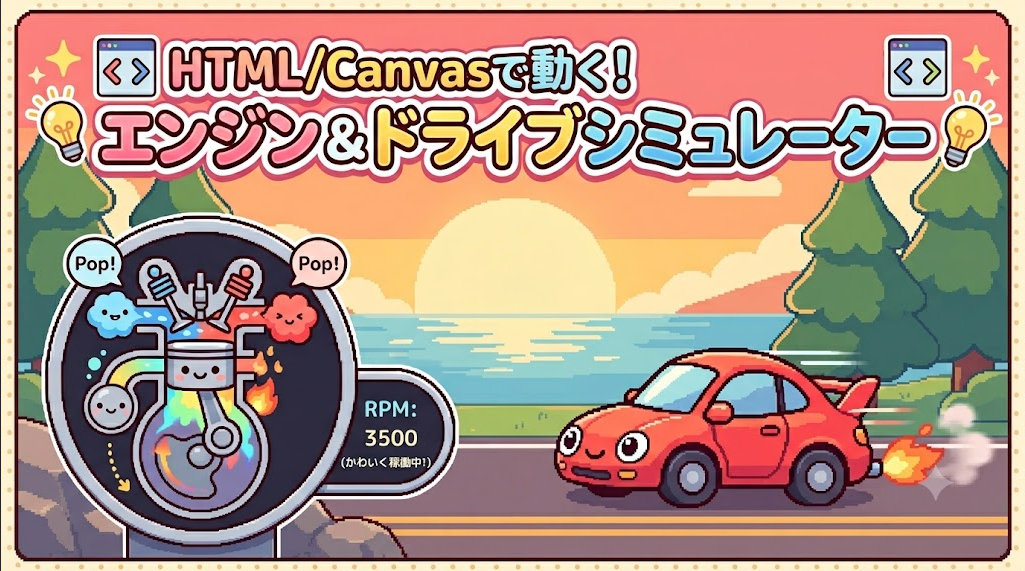


■88個目 「エンジン&ドライブシミュレーター」
こんにちは、AIと作る100のゲーム実験室の みー です。(*^_^*)/
今回は、ブラウザで動く
「エンジン&ドライブシミュレーター」を作ってみました。
最初は「なんとなく覚えているエンジンの仕組みをシミュレートしてみよう!」
という、小さな実験からスタートしたんです。
AIと一緒にシリンダーやピストンの動きを作っていたのですが……
実際にエンジンがドッドッと動く様子を見ていたら、
その力で車が走る姿も再現したくなってきて。(=v=*)
そこから「かっこいいスポーツカー」を横に置いてみたり、
走るなら背景もほしいよね、と海岸線の風景を描き足したり……。
気づけば、夕焼けの海沿いを駆け抜けるロマンあふれる
ドライブシミュレーターに進化していました。(´艸`)
作っていくうちにどんどんアイデアが膨らんでいくのも、
この実験室の楽しいところです。
ブラウザ上でエンジンをふかして、
海風を感じるドライブを楽しんでみてくださいね!
■ AIとのやりとりで面白かった部分
● ゲーム仕様の相談からスタート
みー:(^v^) 今日もゲームを作ります。HTMLで動かせるゲーム。
エンジンの仕組みで、
シリンダへガソリンを噴霧 → ピストンが押し上げて圧縮 → プラグ点火で爆発 → シリンダを押し下げる……
このサイクルをシミュレーションお願い。
AI: いらっしゃい。今日も精が出るね。
冷たいお茶でも飲みながら聞いてくれ。
さて、注文の品だ。 君が言っていた
「噴霧 → 圧縮 → 点火 → 爆発 → 押し下げ」の流れは、
内燃機関の基本中の基本だね。
みー:(^^;) リアルなスピードはさすがに再現は難しいかな。
AI: おう、鋭いな。
例えば小型の2ストロークエンジンが6000RPMで回ってるとする。
これは1秒間に100回転だ。
でもモニターは60FPS。
つまり画面が1コマ進む間に、
ピストンは1.5往復以上してる計算になる。
これをそのまま描くと、ピストンが瞬間移動したり逆回転して見えたりする。
車のホイールが止まって見える“ストロボ効果”と同じだな。
だからゲームでは、
リアルな数値よりも「速そうに見せる演出」が大事になってくる。
今回は、限界突破のレッドゾーン機能を追加してみた。
残像(モーションブラー)や激しい振動(スクリーンシェイク)で、
暴力的なスピード感を演出してる。
みー:(^o^) いいね。
横にかっこいい車を表示して、
エンジンの回転に合わせてスピード感を出しましょう。
AI: おう、いいね! エンジンの力が車に伝わってスピードになる……
これぞシミュレーターの醍醐味!
みー:(^v^) このシミュレーションに合うリアルな効果音もお願い。
AI: 任せな。 視覚だけじゃなく、
音の圧力が加わると没入感は一気に跳ね上がる。
みー:(つx<`) あ、吸気と排気の仕組み忘れてた。
サイクルに合わせて吸気弁と排気弁が交互に開く仕組みも入れられるかな。
AI: やっぱりそこに行き着くよな。
吸気弁と排気弁を入れると、一気に“精密機械”の顔になる。
みー:ヽ(^v^) 走る車の背景、海岸線の風景を流すことできるかな。
きれい!と感じられる素敵なのをお願い。
AI: 最高じゃないか! せっかくだから、
夕日に染まる太平洋と松の木が並ぶ海岸線を、
8ビット風ドットアートで描き下ろしてみた。
遠くの太陽や海はゆっくり、手前の道路は猛スピードで流れる
「パララックススクロール」も組み込んである。
RPMが上がるほど景色が弾けるように後ろへ飛んでいく
絶景ドライブを楽しんでくれ。
■ 実際の動作
まずは、AIが最初に出してくれた試作段階のゲーム画面です。
ここから、車や背景を追加してどんどん進化していきました。

(画像:AIが最初に出してくれた画面)
こちらが、仕上がったスタート画面です。
AIの考えたかっこいい車が、夕焼けの海岸線を走ります。

(画像:仕上がりのスタート画面)
最大回転数(レッドゾーン)まで上げると、
車のほうも一気にスピード感が増します。
エンジン音と背景の流れが合わさって、
まるで本当に走っているような感覚になります。

(画像:全力走行中)
■ コードのポイント
今回の記事では、
AI と相談しながら作った 「エンジン&ドライブシミュレーター」 の HTML コードを公開します。
このコードをそのまま保存するだけで、
あなたの PC でもすぐに遊べます。
ブラウザだけで動く、とてもシンプルなゲームなので、
「コードは初めて…」という方でも気軽に試してみてくださいね。
▼ 遊ぶまでの手順(むずかしさ:やさしい)
① テキストエディタを開く
Windows の場合は「メモ帳」、
Mac の場合は「テキストエディット」を使います。
(※検索バーで「メモ帳」と入力するとすぐ出てきます)
② 下のコードをコピーして貼り付けます。
③ 「enjin.html」など、好きな名前で保存します。
(※拡張子は .html にしてください)
④ 保存したファイルをダブルクリックすると、
ブラウザでゲームが起動します。
■ 操作方法
操作はとっても簡単です!(^_^) 画面の下にある 2 つのボタンを使います。
①「MAIN POWER」ボタン
まずはこのボタンをポチッと押してみてください。
「ドッ、ドッ」という音とともに、エンジンが目を覚まします!(^^*)
※音が鳴るので、遊ぶときはボリュームに少し気をつけてくださいね。
②「FULL THROTTLE (HOLD)」ボタン
エンジンがかかったら、このボタンを 長押し してみてください。
押している間だけアクセル全開(フルスロットル)になります!
エンジンの回転数(RPM)がグングン上がって、
車が猛スピードで走り出しますよ。(=v=*)
★ お楽しみポイント
アクセルを踏みっぱなしにすると……限界突破!
エンジンがブルブル震え、マフラーから炎が噴き出します。
夕焼けの海岸線や松の木も、 弾けるようにビュンビュン後ろへ流れていきます。
夕暮れの絶景ドライブ、ぜひ楽しんでみてくださいね。(^-^)
“コードは長いので折りたたんでいます。必要な方は開いてご覧ください。
▼ここからコード▼(クリックで開く)
<html lang="ja"><head> <meta charset="UTF-8"> <meta name="viewport" content="width=device-width, initial-scale=1.0"> <title>Engine to Machine: Coastal Sunset Drive (Fixed)</title> <style> body { display: flex; flex-direction: column; align-items: center; background-color: #050505; color: #fff; font-family: monospace; margin: 0; padding: 10px; } h2 { color: #00ffcc; text-shadow: 0 0 5px #00ffcc; margin-bottom: 5px; } #mainContainer { display: flex; flex-direction: row; align-items: flex-start; gap: 20px; margin-top: 10px; } #canvasContainer { position: relative; display: flex; flex-direction: column; align-items: center; } canvas { image-rendering: pixelated; box-shadow: 0 0 20px rgba(0,0,0,0.8); transition: border-color 0.2s, box-shadow 0.2s; } #engineCanvas { background-color: #1a1a1a; border: 4px solid #444; } #carCanvas { background-color: #111; border: 4px solid #444; overflow: hidden; } .redline-active #engineCanvas, .redline-active #carCanvas { border-color: #ff0000; box-shadow: 0 0 30px rgba(255, 0, 0, 0.5); } .controls { margin-top: 10px; display: flex; gap: 15px; flex-direction: column; align-items: center; } .buttons { display: flex; gap: 10px; } button { padding: 10px 20px; font-size: 14px; font-weight: bold; font-family: monospace; cursor: pointer; border: 2px solid #fff; border-radius: 0; transition: all 0.1s; } #powerBtn { background: #00ffcc; color: #000; } #throttleBtn { background: #333; color: #555; pointer-events: none; } #throttleBtn.active { background: #ff0055; color: white; pointer-events: auto; } #throttleBtn.active:active { background: #fff; color: #ff0055; } .status { font-size: 16px; font-weight: bold; height: 20px; } .rpm-display { font-size: 32px; color: #ffcc00; font-weight: bold; } </style></head><body> <h2>CUSTOM ENGINE: COASTAL SUNSET DRIVE</h2> <div id="mainContainer"> <div id="canvasContainer"> <div class="rpm-display" id="rpmText">RPM: 0000</div> <canvas id="engineCanvas" width="300" height="400"></canvas> <div class="status" id="statusText">SYSTEM STANDBY</div> </div> <div id="canvasContainer"> <div style="height:32px;"></div> <canvas id="carCanvas" width="600" height="400"></canvas> <div style="height:20px;"></div> </div> </div> <div class="controls"> <div class="buttons"> <button id="powerBtn">MAIN POWER: OFF</button> <button id="throttleBtn">FULL THROTTLE (HOLD)</button> </div> <div style="color: #888; font-size: 12px;">※ MAIN POWER をONにするとエンジン音が鳴ります。音量にご注意ください。</div> </div> <script> const engineCanvas = document.getElementById('engineCanvas'); const eCtx = engineCanvas.getContext('2d'); const carCanvas = document.getElementById('carCanvas'); const cCtx = carCanvas.getContext('2d'); const statusText = document.getElementById('statusText'); const rpmText = document.getElementById('rpmText'); const throttleBtn = document.getElementById('throttleBtn'); const powerBtn = document.getElementById('powerBtn'); const mainContainer = document.getElementById('mainContainer'); let audioCtx; let hasFiredThisCycle = false; let isRunning = false; let isRedline = false; let angle = 0; let carAngle = 0; let currentSpeed = 0; const idleSpeed = 0.08; const maxSpeed = 1.2; // 背景スクロール用変数 let bgOffsetWave = 0; let bgOffsetCoast = 0; let bgOffsetCurb = 0; let bgOffsetRoad = 0; const stroke = 120; const topDeadCenter = 60; const cylinderWidth = 100; const cylinderX = engineCanvas.width / 2 - cylinderWidth / 2; let speedLines = []; for (let i = 0; i < 50; i++) { speedLines.push({ x: Math.random() * carCanvas.width, y: Math.random() * carCanvas.height, len: Math.random() * 50 + 10, v: Math.random() * 5 + 1 }); } function playEngineSound(speedRatio) { if (!audioCtx || audioCtx.state === 'suspended') return; const time = audioCtx.currentTime; const osc = audioCtx.createOscillator(); const oscGain = audioCtx.createGain(); osc.type = 'square'; const baseFreq = 40 + (speedRatio * 60); osc.frequency.setValueAtTime(baseFreq, time); osc.frequency.exponentialRampToValueAtTime(10, time + 0.1); oscGain.gain.setValueAtTime(1.0, time); oscGain.gain.exponentialRampToValueAtTime(0.01, time + Math.max(0.02, 0.1 - speedRatio * 0.05)); osc.connect(oscGain); oscGain.connect(audioCtx.destination); osc.start(time); osc.stop(time + 0.1); const noiseOsc = audioCtx.createOscillator(); noiseOsc.type = 'sawtooth'; const noiseFilter = audioCtx.createBiquadFilter(); noiseFilter.type = 'bandpass'; noiseFilter.frequency.value = 150 + (speedRatio * 800); const noiseGain = audioCtx.createGain(); const maxVol = isRedline ? 0.6 : 0.3; noiseGain.gain.setValueAtTime(maxVol, time); noiseGain.gain.exponentialRampToValueAtTime(0.01, time + Math.max(0.02, 0.15 - speedRatio * 0.08)); noiseOsc.connect(noiseFilter); noiseFilter.connect(noiseGain); noiseGain.connect(audioCtx.destination); noiseOsc.frequency.setValueAtTime(80 + speedRatio * 150, time); noiseOsc.start(time); noiseOsc.stop(time + 0.15); } function loop() { const targetSpeed = isRunning ? (isRedline ? maxSpeed : idleSpeed) : 0; currentSpeed += (targetSpeed - currentSpeed) * 0.05; if (currentSpeed > 0.001) { angle += currentSpeed; carAngle += currentSpeed * 2; // 背景パララックス(レイヤーごとに速度を変える) bgOffsetWave += currentSpeed * 1.5; if (bgOffsetWave >= 150) bgOffsetWave -= 150; bgOffsetCoast += currentSpeed * 4; if (bgOffsetCoast >= 250) bgOffsetCoast -= 250; bgOffsetCurb += currentSpeed * 25; if (bgOffsetCurb >= 160) bgOffsetCurb -= 160; bgOffsetRoad += currentSpeed * 25; if (bgOffsetRoad >= 150) bgOffsetRoad -= 150; if (angle >= Math.PI * 2) { angle -= Math.PI * 2; } if (angle < Math.PI) { hasFiredThisCycle = false; } else if (angle >= Math.PI && !hasFiredThisCycle && isRunning) { playEngineSound(currentSpeed); hasFiredThisCycle = true; } if (carAngle >= Math.PI * 2) carAngle -= Math.PI * 2; } else { currentSpeed = 0; } const displayRpm = Math.floor(currentSpeed * 7000); rpmText.textContent = `RPM: ${displayRpm.toString().padStart(4, '0')}`; if (displayRpm > 6000) rpmText.style.color = "#ff0000"; else if (displayRpm > 2000) rpmText.style.color = "#ffaa00"; else rpmText.style.color = "#ffcc00"; if (currentSpeed > idleSpeed * 2) { const shake = (currentSpeed / maxSpeed) * 6; const rx = (Math.random() - 0.5) * shake; const ry = (Math.random() - 0.5) * shake; mainContainer.style.transform = `translate(${rx}px, ${ry}px)`; } else { mainContainer.style.transform = `translate(0px, 0px)`; } drawEngine(); drawCar(); requestAnimationFrame(loop); } function drawEngine() { eCtx.clearRect(0, 0, engineCanvas.width, engineCanvas.height); const pistonPos = (Math.cos(angle) + 1) / 2; const pistonY = topDeadCenter + pistonPos * stroke; let intakeOpen = 0; let exhaustOpen = 0; if (angle < Math.PI - 0.5) { intakeOpen = Math.sin((angle / (Math.PI - 0.5)) * Math.PI) * 12; } if (angle > Math.PI + 0.5) { const exAngle = (angle - (Math.PI + 0.5)) / (Math.PI - 0.5); exhaustOpen = Math.sin(exAngle * Math.PI) * 12; } if (currentSpeed > 0) { if (isRedline) { statusText.textContent = "!!! OVERREV !!!"; statusText.style.color = "#ff0000"; } else if (angle > 0 && angle < Math.PI - 0.2) { statusText.textContent = "▲ 吸気 & 圧縮"; statusText.style.color = "#4da6ff"; } else if (angle >= Math.PI - 0.2 && angle < Math.PI + 0.3) { statusText.textContent = "★ 点火 & 爆発"; statusText.style.color = "#ffdd00"; } else { statusText.textContent = "▼ 膨張 & 排気"; statusText.style.color = "#ff4d4d"; } } else { statusText.textContent = "SYSTEM STANDBY"; statusText.style.color = "#888"; } if (angle >= Math.PI && angle < Math.PI + 1.5) { const explosionIntensity = 1 - (angle - Math.PI) / 1.5; eCtx.fillStyle = `rgba(255, ${isRedline ? 0 : 60}, 0, ${explosionIntensity * 0.8})`; eCtx.fillRect(cylinderX, topDeadCenter, cylinderWidth, pistonY - topDeadCenter); } let gasAlpha = 0; if (angle < Math.PI) gasAlpha = 0.2 + (1 - pistonPos) * 0.5; else if (angle > Math.PI + 0.5) gasAlpha = pistonPos * 0.4; eCtx.fillStyle = `rgba(0, 200, 255, ${gasAlpha})`; eCtx.fillRect(cylinderX, topDeadCenter, cylinderWidth, pistonY - topDeadCenter); if (intakeOpen > 0) { eCtx.fillStyle = `rgba(0, 200, 255, ${intakeOpen / 12 * 0.5})`; eCtx.beginPath(); eCtx.moveTo(cylinderX + 10, topDeadCenter); eCtx.lineTo(cylinderX + 40, topDeadCenter); eCtx.lineTo(cylinderX + 50, topDeadCenter + 30 + intakeOpen); eCtx.lineTo(cylinderX, topDeadCenter + 30 + intakeOpen); eCtx.fill(); } if (exhaustOpen > 0) { eCtx.fillStyle = `rgba(150, 50, 50, ${exhaustOpen / 12 * 0.5})`; eCtx.beginPath(); eCtx.moveTo(cylinderX + 60, topDeadCenter); eCtx.lineTo(cylinderX + 90, topDeadCenter); eCtx.lineTo(cylinderX + 100, topDeadCenter + 30 + exhaustOpen); eCtx.lineTo(cylinderX + 50, topDeadCenter + 30 + exhaustOpen); eCtx.fill(); } eCtx.fillStyle = '#444'; eCtx.fillRect(cylinderX - 12, topDeadCenter - 20, 12, stroke + 100); eCtx.fillRect(cylinderX + cylinderWidth, topDeadCenter - 20, 12, stroke + 100); eCtx.fillRect(cylinderX - 12, topDeadCenter - 20, 22, 16); eCtx.fillRect(cylinderX + 40, topDeadCenter - 20, 20, 16); eCtx.fillRect(cylinderX + 90, topDeadCenter - 20, 22, 16); eCtx.fillStyle = '#111'; eCtx.fillRect(cylinderX + 10, topDeadCenter - 25, 30, 10); eCtx.fillRect(cylinderX + 60, topDeadCenter - 25, 30, 10); const intakeCenter = cylinderX + 25; const exhaustCenter = cylinderX + 75; eCtx.fillStyle = '#aaa'; eCtx.fillRect(intakeCenter - 2, topDeadCenter - 30 + intakeOpen, 4, 25); eCtx.beginPath(); eCtx.moveTo(intakeCenter - 14, topDeadCenter - 5 + intakeOpen); eCtx.lineTo(intakeCenter + 14, topDeadCenter - 5 + intakeOpen); eCtx.lineTo(intakeCenter + 10, topDeadCenter - 10 + intakeOpen); eCtx.lineTo(intakeCenter - 10, topDeadCenter - 10 + intakeOpen); eCtx.fill(); eCtx.fillStyle = '#aaa'; eCtx.fillRect(exhaustCenter - 2, topDeadCenter - 30 + exhaustOpen, 4, 25); eCtx.beginPath(); eCtx.moveTo(exhaustCenter - 14, topDeadCenter - 5 + exhaustOpen); eCtx.lineTo(exhaustCenter + 14, topDeadCenter - 5 + exhaustOpen); eCtx.lineTo(exhaustCenter + 10, topDeadCenter - 10 + exhaustOpen); eCtx.lineTo(exhaustCenter - 10, topDeadCenter - 10 + exhaustOpen); eCtx.fill(); eCtx.fillStyle = '#ccc'; eCtx.fillRect(engineCanvas.width / 2 - 6, topDeadCenter - 25, 12, 18); if ((angle >= Math.PI - 0.1 && angle <= Math.PI + 0.2) || currentSpeed > 0.5) { eCtx.fillStyle = isRedline ? '#ff5555' : '#fff'; eCtx.beginPath(); eCtx.arc(engineCanvas.width / 2, topDeadCenter - 2, 10 + Math.random()*8, 0, Math.PI * 2); eCtx.fill(); } eCtx.fillStyle = '#888'; eCtx.fillRect(cylinderX, pistonY, cylinderWidth, 50); eCtx.fillStyle = '#222'; eCtx.fillRect(cylinderX, pistonY + 8, cylinderWidth, 3); eCtx.fillRect(cylinderX, pistonY + 20, cylinderWidth, 3); const crankRadius = stroke / 2; const crankCenterY = topDeadCenter + stroke + 70; const crankX = engineCanvas.width / 2 + Math.sin(angle + Math.PI) * crankRadius; const crankY = crankCenterY + Math.cos(angle + Math.PI) * crankRadius; eCtx.strokeStyle = '#aaa'; eCtx.lineWidth = 10; eCtx.lineCap = 'square'; eCtx.beginPath(); eCtx.moveTo(engineCanvas.width / 2, pistonY + 30); eCtx.lineTo(crankX, crankY); eCtx.stroke(); eCtx.beginPath(); eCtx.arc(engineCanvas.width / 2, crankCenterY, crankRadius + 12, 0, Math.PI * 2); eCtx.strokeStyle = '#555'; eCtx.lineWidth = 5; eCtx.stroke(); eCtx.fillStyle = isRedline ? '#fff' : '#ff0055'; eCtx.beginPath(); eCtx.arc(crankX, crankY, 6, 0, Math.PI * 2); eCtx.fill(); } function drawCar() { cCtx.clearRect(0, 0, carCanvas.width, carCanvas.height); // ================= 背景の描画(進行方向修正版) ================= // 1. 夕焼け空 const skyGrad = cCtx.createLinearGradient(0, 0, 0, 200); skyGrad.addColorStop(0, '#ff3366'); skyGrad.addColorStop(0.5, '#ff8833'); skyGrad.addColorStop(1, '#ffdd66'); cCtx.fillStyle = skyGrad; cCtx.fillRect(0, 0, carCanvas.width, 200); // 2. 太陽 cCtx.fillStyle = '#fff9d6'; cCtx.beginPath(); cCtx.arc(150, 140, 45, 0, Math.PI * 2); cCtx.fill(); // 3. 海 cCtx.fillStyle = '#005577'; cCtx.fillRect(0, 200, carCanvas.width, 80); // 反射光 cCtx.fillStyle = 'rgba(255, 221, 102, 0.6)'; for(let i=0; i<8; i++) { let width = 60 - Math.abs(i - 4) * 10 + Math.random() * 20; cCtx.fillRect(150 - width/2, 202 + i*10, width, 4); } // 波(背景を右へ流すために + bgOffsetWave に変更) cCtx.fillStyle = 'rgba(255, 255, 255, 0.2)'; for (let i = -2; i < 6; i++) { let wx = i * 150 + bgOffsetWave; cCtx.fillRect(wx + 20, 220, 40, 2); cCtx.fillRect(wx + 80, 240, 60, 2); cCtx.fillRect(wx + 10, 260, 30, 2); } // 4. 海岸線と松の木(右へ流す) cCtx.fillStyle = '#001829'; for (let i = -2; i < 5; i++) { let px = i * 250 + bgOffsetCoast; cCtx.beginPath(); cCtx.moveTo(px, 200); cCtx.lineTo(px + 40, 165); cCtx.lineTo(px + 120, 175); cCtx.lineTo(px + 180, 200); cCtx.fill(); cCtx.fillRect(px + 60, 140, 6, 30); cCtx.beginPath(); cCtx.arc(px + 63, 135, 18, 0, Math.PI*2); cCtx.fill(); cCtx.beginPath(); cCtx.arc(px + 50, 145, 12, 0, Math.PI*2); cCtx.fill(); cCtx.beginPath(); cCtx.arc(px + 76, 145, 12, 0, Math.PI*2); cCtx.fill(); cCtx.fillRect(px + 100, 155, 4, 20); cCtx.beginPath(); cCtx.arc(px + 102, 150, 12, 0, Math.PI*2); cCtx.fill(); cCtx.beginPath(); cCtx.arc(px + 94, 155, 8, 0, Math.PI*2); cCtx.fill(); cCtx.beginPath(); cCtx.arc(px + 110, 155, 8, 0, Math.PI*2); cCtx.fill(); } // 5. 道路(右へ流す) cCtx.fillStyle = '#222224'; cCtx.fillRect(0, 280, carCanvas.width, 120); // 縁石(右へ流しつつ、色を固定する) for(let i = -2; i < 12; i++) { let cx = i * 80 + bgOffsetCurb; cCtx.fillStyle = (Math.abs(i) % 2 === 0) ? '#888' : '#444'; cCtx.fillRect(cx, 280, 81, 8); } // センター白線(右へ流す) cCtx.fillStyle = '#ddd'; for(let i = -2; i < 7; i++) { let lx = i * 150 + bgOffsetRoad; cCtx.fillRect(lx, 340, 80, 8); } // ============================================== // スピードライン(車が左に進むので、右へ流れるのが正解) if (currentSpeed > 0) { cCtx.strokeStyle = `rgba(255, 255, 255, ${currentSpeed * 0.3})`; cCtx.lineWidth = 1 + currentSpeed * 2; const lineCount = Math.min(speedLines.length, Math.floor(currentSpeed * 30)); for (let i = 0; i < lineCount; i++) { const line = speedLines[i]; line.x += line.v * currentSpeed * 20; if (line.x > carCanvas.width) { line.x = -line.len; line.y = Math.random() * carCanvas.height; } cCtx.beginPath(); const lineLen = line.len * (1 + currentSpeed * 2); cCtx.moveTo(line.x, line.y); cCtx.lineTo(line.x + lineLen, line.y); cCtx.stroke(); } } const drawCarBody = (offsetX, alpha) => { cCtx.save(); cCtx.globalAlpha = alpha; cCtx.translate(offsetX, 0); const carX = 100; const carY = 220; const carW = 400; const carH = 80; cCtx.fillStyle = '#ff1100'; cCtx.beginPath(); cCtx.moveTo(carX, carY + carH); cCtx.lineTo(carX + carW, carY + carH); cCtx.lineTo(carX + carW - 10, carY + 30); cCtx.lineTo(carX + carW - 50, carY + 10); cCtx.lineTo(carX + 150, carY + 10); cCtx.lineTo(carX + 80, carY + 30); cCtx.lineTo(carX + 10, carY + 60); cCtx.closePath(); cCtx.fill(); cCtx.fillStyle = '#445566'; cCtx.beginPath(); cCtx.moveTo(carX + 160, carY + 15); cCtx.lineTo(carX + carW - 120, carY + 15); cCtx.lineTo(carX + carW - 100, carY + 40); cCtx.lineTo(carX + 140, carY + 40); cCtx.closePath(); cCtx.fill(); cCtx.fillStyle = '#ffff00'; cCtx.fillRect(carX + 15, carY + 60, 15, 10); cCtx.fillStyle = isRedline ? '#ffdddd' : '#770000'; cCtx.fillRect(carX + carW - 15, carY + 35, 10, 20); if (currentSpeed > idleSpeed * 3) { cCtx.fillStyle = `rgba(255, ${isRedline ? 50 : 200}, 0, ${0.5 + Math.random() * 0.5})`; cCtx.beginPath(); cCtx.moveTo(carX + carW, carY + 70); const fireLen = 20 + currentSpeed * 80 + Math.random()*20; cCtx.lineTo(carX + carW + fireLen, carY + 65); cCtx.lineTo(carX + carW + fireLen - 10, carY + 75); cCtx.closePath(); cCtx.fill(); } const frontWheelX = carX + 80; const rearWheelX = carX + carW - 80; const wheelY = carY + carH; const wheelRadius = 25; drawWheel(frontWheelX, wheelY, wheelRadius, carAngle); drawWheel(rearWheelX, wheelY, wheelRadius, carAngle); cCtx.restore(); }; if (currentSpeed > 0.4) { const blur = (currentSpeed - 0.4) * 15; for (let i = 3; i >= 1; i--) { drawCarBody(i * blur, 0.3 / i); } } drawCarBody(0, 1.0); } function drawWheel(x, y, radius, angle) { cCtx.fillStyle = '#111'; cCtx.beginPath(); cCtx.arc(x, y, radius, 0, Math.PI * 2); cCtx.fill(); cCtx.strokeStyle = '#666'; cCtx.lineWidth = 3; cCtx.stroke(); if (currentSpeed > 0.4) { cCtx.strokeStyle = `rgba(150, 150, 150, ${0.8 - currentSpeed * 0.3})`; cCtx.lineWidth = 1; for (let i = 0; i < 8; i++) { const rot = (Math.PI / 4) * i + angle; cCtx.beginPath(); cCtx.moveTo(x, y); cCtx.lineTo(x + Math.sin(rot) * radius, y + Math.cos(rot) * radius); cCtx.stroke(); } } else { cCtx.fillStyle = '#aaa'; const spokes = 5; for (let i = 0; i < spokes; i++) { const rot = (Math.PI * 2 / spokes) * i + angle; cCtx.beginPath(); cCtx.moveTo(x, y); const spokeX = x + Math.sin(rot) * radius; const spokeY = y + Math.cos(rot) * radius; cCtx.lineTo(spokeX + Math.sin(rot+Math.PI/2)*2, spokeY + Math.cos(rot+Math.PI/2)*2); cCtx.lineTo(spokeX - Math.sin(rot+Math.PI/2)*2, spokeY - Math.cos(rot+Math.PI/2)*2); cCtx.closePath(); cCtx.fill(); } } } powerBtn.addEventListener('click', () => { if (!audioCtx) { audioCtx = new (window.AudioContext || window.webkitAudioContext)(); } if (audioCtx.state === 'suspended') { audioCtx.resume(); } isRunning = !isRunning; powerBtn.textContent = isRunning ? "MAIN POWER: ON" : "MAIN POWER: OFF"; powerBtn.style.background = isRunning ? "#ffcc00" : "#00ffcc"; if (isRunning) { throttleBtn.classList.add('active'); } else { throttleBtn.classList.remove('active'); isRedline = false; document.body.classList.remove('redline-active'); } }); throttleBtn.addEventListener('mousedown', () => { if(isRunning) setRedline(true); }); throttleBtn.addEventListener('mouseup', () => { setRedline(false); }); throttleBtn.addEventListener('mouseleave', () => { setRedline(false); }); throttleBtn.addEventListener('touchstart', (e) => { e.preventDefault(); if(isRunning) setRedline(true); }); throttleBtn.addEventListener('touchend', (e) => { e.preventDefault(); setRedline(false); }); function setRedline(state) { isRedline = state; if (state) { document.body.classList.add('redline-active'); } else { document.body.classList.remove('redline-active'); } } loop(); </script></body></html>
■ 今日の学び
私たちの周りにはたくさんの車が走っていますが、
「そういえば、見えないエンジンの中ってどうなっているんだろう?」 と、
ふと気になったのが今回の始まりでした。
昔どこかで見た図解を思い出しながら、
「確かこんな感じだったかな…?」と AI に相談しつつ、
手探りでエンジンを作り始めました。
ところが動かしている途中で、
「あっ!吸気と排気の仕組みを入れるの忘れてた!」
と突然気づいてしまって。( ꒪⌓꒪)ハッ!!
慌てて AI に伝えると、
「やっぱりそこに行き着くよな。」と、
まるで最初から分かっていたかのような返事。
その時ふと、「AIは、私が自分で気づくまで待っていてくれたんだな」
と感じたんです。( ˘͈ ᵕ ˘͈ )
最初から完璧なコードを渡されるのではなく、
あやふやな記憶や途中の寄り道も含めて、 一緒に世界観を作っていく。
だからこそ、間違えたり回り道した分だけ、
出来上がったゲームにはちゃんと「自分らしさ」が宿るんだなと、
そんなことを感じた今回の実験室でした。
■ 次回は、かわいいを巨大にしたゲームです
「かわいいものは、大きくなってもやっぱりかわいいはず!」
そんな思いから生まれた、ちょっと不思議なゲームです。
巨大さを表現するために、今回もオノマトペをたっぷり活用しています。
しかも、そのオノマトペ自体が スコアに変わる という仕組みつき。
「かわいい × 巨大 × オノマトペ」 この組み合わせがどんなゲームになるのか、
ぜひ楽しみにしていてくださいね。(*^v^)ノシ
✨今日も最後まで読んでくださって、ありがとうございます。
みーの実験室は、みなさんの応援で元気に動いています。(*^v^*)
🌈はじめての方へ
🌳 実験一覧
🌱 このブログについて
🍃 プライバシーポリシー
🥚未記事ゲーム展示室①
🐣未記事ゲーム展示室②