

■32個目「しょうが君シャボン」
こんにちは、AIと作る100のゲーム実験室の みー です。(*^_^*)/
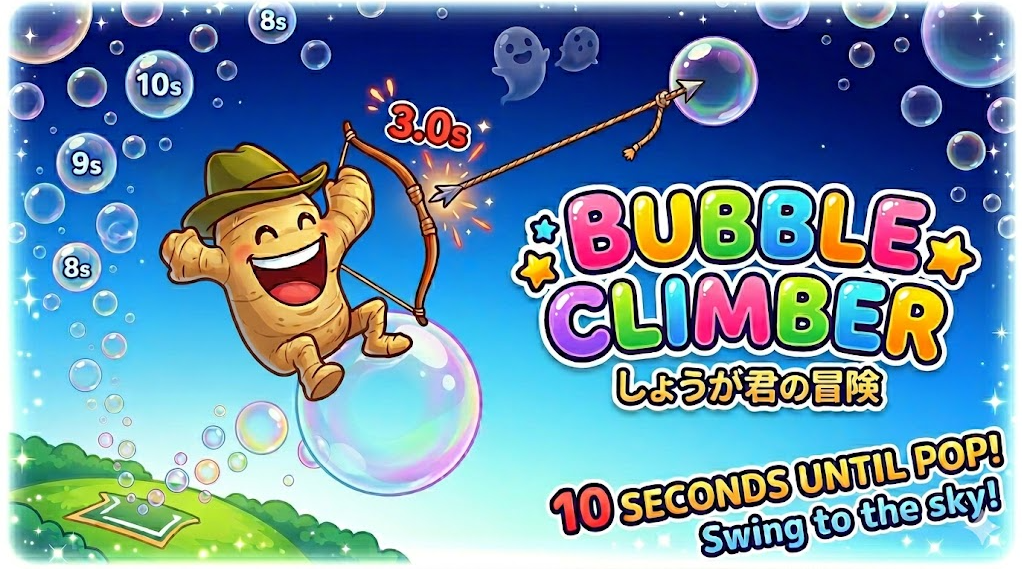
今回は、「しょうが君」を主役に、
幻想的な空の旅をテーマにしたゲームを作ってみました。
しょうが君は、以前のアクションゲームでも活躍してくれた、
冒険者風の帽子と満面の笑顔がトレードマークの愛すべきキャラです。
そんな彼が今回は「ひも付きの弓矢」を手に、
どこまでも続くシャボン玉の道をつないで空高く登っていく――
ちょっとメルヘンで、でもスリリングな冒険になりました。
舞台は、無数のシャボン玉がふわふわと湧き上がる不思議な空。
地上からスタートしたしょうが君は、弓矢を放って空中のシャボン玉を射抜き、
その引き寄せる力でピョーンと飛び移っていきます。
シャボン玉の上に乗ると、まるで小さな惑星にいるみたいに
くるくる歩き回れるのが面白いポイント!(@v@`)
ただし、シャボン玉はとってもデリケート。
乗ってから10秒(上空ほど短くなり、最短3秒!)でパチンと割れてしまうので、
次から次へと狙いを定める集中力が必要です。
癒やしのオルゴール風BGMの中で、
「次はあっち!」「あ、割れるー!」と手に汗握る、
新感覚のスカイアクションゲームになりました。
弓矢で狙いをつける感触がクセになるので、
よかったらハイスコアを目指して楽しんでみてください。(^^)
■ AIとのやりとりで面白かった部分
(^^*)今日もゲーム作ります。html形式で動かせるゲームです。
上昇していく色々な大きさのシャボン玉があります。シャボン玉自体に重力を付けて、
その上にキャラクターを乗せてぐるぐる歩き回れるようにしたいです。
ゲームとしては、地上がスタート地点で、
キャラクターがひも付き弓矢(アーチェリー風)で
シャボン玉を狙って打ちます。
シャボン玉に当たるとキャラクターはそのシャボン玉に引き寄せられ、
中心に向かう重力でシャボン玉の上に立つ感じになります。
ただしシャボン玉は10秒以内(上空ほど短く最短3秒)で割れてしまうので、
次のシャボン玉へ移らないと地面に落ちてゲームオーバーです。
(AI)いらっしゃいませ!常連さんもレベルが上がってくると、
注文がだんだんテクニカルになってきますね。
今日のご要望は、空中に浮かぶシャボン玉を足場に登っていく、
幻想的で少しスリリングなアクションゲームですね。
「シャボン玉の表面を歩く」挙動を実現するために、
各シャボン玉に独自の重力を持たせ、キャラクターが常に中心を向くように回転させる仕組みを組み込みました。
(^_^)キャラクターは以前のアクションゲームで作ったしょうが君にできますか?
(満面の笑顔で、楕円の胴体と手足、冒険者風の帽子をかぶったキャラです)
(AI)承知いたしました!懐かしの「しょうが君」再登場ですね。
あの満面の笑顔と冒険者スタイルの再会、私も嬉しいです。
(*^^)しょうが君と地面と弓矢はいい感じです。
シャボン玉が出てこないので、そのあたりを修正できたらゲームが始まるかな。
(AI)おおっと、マスター痛恨のミスです!
実は裏側でシャボン玉は生成されていたんですが、
「画面のずっと上」から発生して、さらに上へ飛んでいく設定になっていました。
しょうが君からしたら、一生見えない成層圏でシャボン玉が飛んでいる状態でしたね。ごめんなさい!
発生位置を画面の下から湧き上がるように修正しました。これでバッチリ遊べるはずです。
【本日の豆知識:シャボン玉の寿命がわかるサイン】
シャボン玉の膜は厚さによって色が変わります。
膜が数10ナノメートルまで薄くなると光を反射できなくなり、
「黒(透明)」に見えるようになります。
つまり、上の方が黒っぽく透けてきたら、それは「もうすぐ割れる!」というサインなんですよ。
■ 実際の動作
まずは、AIとの相談で作ってもらったゲームの初期状態です。
図形だけでシンプルに表現されています。

(画像:AIが最初に作った状態)

こちらが今回の仕上がり状態です。
背景にもシャボン玉がうっすらと浮かび、どんどん高いシャボン玉へ飛び移っていく
メルヘンな雰囲気が出ています。

(画像:完成版の画面)
弓矢でシャボン玉を狙って撃ち、当たるとそのシャボン玉に飛びつきます。
高いところへ行くほど、シャボン玉が割れるまでの時間が短くなっていきます。

(画像:飛び移りの様子)
■ コードのポイント
今回の記事では、AI と相談しながら作った
「しょうが君シャボン」の HTML コードを公開します。
ブラウザだけで動く、とてもシンプルなゲームです。
コードといっても難しい部分はありません。
貼り付けて保存するだけで動くので、気軽に試してみてください。
【遊ぶまでの手順】
1. PC の「メモ帳」(※Windows の場合)を開きます。
2. 下のコードをコピーして貼り付けます。
3. 「syabon.html」など、好きな名前で保存します。
4. 保存したファイルをブラウザで開くだけで遊べます。
【操作説明】
マウスとキーボードを駆使して空の頂点を目指しましょう!
ルール:
シャボン玉の寿命は最大10秒(高度が上がるほど短縮)。
割れる前に次の玉を射抜き、ひもで飛び移っていきます。
落下したら冒険終了です。
移動:
[←][→] または [A][D] キー。
シャボン玉の上では中心に向かって重力が働くため、表面をくるくる歩き回れます。
弓矢発射:
[Space] キーを長押ししながら、飛ばしたい方向と逆へマウスをドラッグ。
▼ここからコード▼(クリックで開く)
<html lang="ja"><head> <meta charset="UTF-8"> <title>Ginger-kun Bubble Climb - Hardcore Fairy Tale</title> <style> body { margin: 0; overflow: hidden; background: #001f3f; user-select: none; } canvas { display: block; background: linear-gradient(to top, #001a35, #005f9e, #6fa8dc); } #ui { position: absolute; top: 15px; left: 15px; color: white; text-shadow: 2px 2px 4px rgba(0,0,0,0.8); font-family: 'Hiragino Kaku Gothic ProN', sans-serif; pointer-events: none; z-index: 10; } .warning { color: #FF4136; font-weight: bold; animation: blink 0.3s infinite; } @keyframes blink { 50% { opacity: 0.5; } } #startScreen { position: absolute; top: 0; left: 0; width: 100%; height: 100%; background: rgba(0, 10, 30, 0.85); color: white; display: flex; flex-direction: column; justify-content: center; align-items: center; z-index: 100; cursor: pointer; font-family: sans-serif; } #startScreen h1 { color: #FFDC00; font-size: 48px; text-shadow: 0 0 10px #FFDC00; } #startScreen p { font-size: 20px; animation: blink 1.5s infinite; } </style></head><body> <div id="startScreen"> <h1>Bubble Climber</h1> <p>画面をクリックして冒険スタート!(♪ 音が出ます)</p> </div> <div id="ui"> <div style="font-size: 28px; font-weight: bold;">Score: <span id="score">0</span> m</div> <div id="timerDisplay" style="font-size: 20px; margin-top: 5px;">Bubble Timer: --</div> <div style="font-size: 14px; margin-top: 15px; background: rgba(0,0,0,0.4); padding: 10px; border-radius: 8px;"> [←][→] または [A][D] : 左右移動<br> [Space]長押し + マウス逆方向ドラッグ : 弓矢発射 </div> </div> <canvas id="gameCanvas"></canvas><script>const canvas = document.getElementById('gameCanvas');const ctx = canvas.getContext('2d');canvas.width = window.innerWidth;canvas.height = window.innerHeight;// --- オーディオシステム ---let audioCtx;let isAudioInitialized = false;function initAudio() { if (isAudioInitialized) return; audioCtx = new (window.AudioContext || window.webkitAudioContext)(); isAudioInitialized = true; document.getElementById('startScreen').style.display = 'none'; playBGM();}function playSound(type) { if (!isAudioInitialized) return; let osc = audioCtx.createOscillator(); let gain = audioCtx.createGain(); osc.connect(gain); gain.connect(audioCtx.destination); let now = audioCtx.currentTime; if (type === 'shoot') { osc.type = 'triangle'; osc.frequency.setValueAtTime(800, now); osc.frequency.exponentialRampToValueAtTime(100, now + 0.15); gain.gain.setValueAtTime(0.3, now); gain.gain.exponentialRampToValueAtTime(0.01, now + 0.15); osc.start(now); osc.stop(now + 0.15); } else if (type === 'hit') { osc.type = 'sine'; osc.frequency.setValueAtTime(1200, now); osc.frequency.exponentialRampToValueAtTime(2000, now + 0.1); gain.gain.setValueAtTime(0.2, now); gain.gain.exponentialRampToValueAtTime(0.01, now + 0.2); osc.start(now); osc.stop(now + 0.2); } else if (type === 'pop') { osc.type = 'sawtooth'; osc.frequency.setValueAtTime(300, now); osc.frequency.exponentialRampToValueAtTime(50, now + 0.1); gain.gain.setValueAtTime(0.4, now); gain.gain.exponentialRampToValueAtTime(0.01, now + 0.1); osc.start(now); osc.stop(now + 0.1); }}function playBGM() { let notes = [523.25, 659.25, 783.99, 1046.50, 783.99, 659.25]; let noteIdx = 0; setInterval(() => { if(gameOver || !isAudioInitialized) return; let osc = audioCtx.createOscillator(); let gain = audioCtx.createGain(); osc.connect(gain); gain.connect(audioCtx.destination); osc.type = 'sine'; osc.frequency.value = notes[noteIdx]; gain.gain.setValueAtTime(0.08, audioCtx.currentTime); gain.gain.exponentialRampToValueAtTime(0.001, audioCtx.currentTime + 0.6); osc.start(); osc.stop(audioCtx.currentTime + 0.6); noteIdx = (noteIdx + 1) % notes.length; }, 450);}document.getElementById('startScreen').addEventListener('click', initAudio);// --- ゲーム設定 ---const GRAVITY = 0.3;const BUBBLE_SPEED = 1.0; const PULL_SPEED = 15;let score = 0;let scrollY = 0;let gameOver = false;let bubbles = [];let bgBubbles = []; // 背景用シャボン玉配列let arrow = null;let player = { x: canvas.width / 2, y: canvas.height - 50, vx: 0, vy: 0, radius: 20, state: 'FREE', angle: -Math.PI / 2, onBubble: null, attachedTime: 0, currentBubbleLifetime: 10, isSpacePressed: false, isAiming: false, dragStart: { x: 0, y: 0 }, dragCurrent: { x: 0, y: 0 }};// --- 入力制御 ---let keys = {};window.addEventListener('keydown', e => { keys[e.code] = true; if(e.code === 'Space' && player.state !== 'PULLING') player.isSpacePressed = true; });window.addEventListener('keyup', e => { keys[e.code] = false; if(e.code === 'Space') { player.isSpacePressed = false; player.isAiming = false; }});canvas.addEventListener('mousedown', e => { if(player.isSpacePressed && !arrow && !gameOver && isAudioInitialized) { player.isAiming = true; player.dragStart = { x: e.clientX, y: e.clientY }; player.dragCurrent = { x: e.clientX, y: e.clientY }; }});canvas.addEventListener('mousemove', e => { if(player.isAiming) player.dragCurrent = { x: e.clientX, y: e.clientY };});canvas.addEventListener('mouseup', e => { if(player.isAiming) { let dx = player.dragStart.x - e.clientX; let dy = player.dragStart.y - e.clientY; let power = Math.min(Math.sqrt(dx*dx + dy*dy) / 8, 30); if (power > 2) { let angle = Math.atan2(dy, dx); arrow = { x: player.x, y: player.y, vx: Math.cos(angle) * power, vy: Math.sin(angle) * power, active: true, attachedBubble: null }; playSound('shoot'); } player.isAiming = false; }});// --- クラス定義 ---// 演出用の背景シャボン玉(判定なし、半透明)class BgBubble { constructor() { this.x = Math.random() * canvas.width; this.y = Math.random() * canvas.height; this.radius = 10 + Math.random() * 40; this.speed = 0.2 + Math.random() * 0.8; this.color = `hsla(${Math.random() * 360}, 50%, 80%, 0.15)`; // 非常に薄い色 } update() { this.y -= this.speed; // 画面上に消えたら下から再出現 if (this.y < -this.radius) { this.y = canvas.height + this.radius; this.x = Math.random() * canvas.width; } } draw() { ctx.beginPath(); ctx.arc(this.x, this.y, this.radius, 0, Math.PI * 2); ctx.fillStyle = this.color; ctx.fill(); ctx.strokeStyle = "rgba(255,255,255,0.1)"; ctx.lineWidth = 1; ctx.stroke(); }}// 足場になる本物のシャボン玉class Bubble { constructor(x, y, r) { this.x = x; this.y = y; this.radius = r; this.color = `hsla(${Math.random() * 360}, 60%, 70%, 0.5)`; this.isPopping = false; } update() { this.y -= BUBBLE_SPEED; } draw() { ctx.save(); ctx.beginPath(); ctx.arc(this.x, this.y - scrollY, this.radius, 0, Math.PI * 2); ctx.fillStyle = this.color; ctx.fill(); ctx.lineWidth = player.onBubble === this ? 4 : 2; ctx.strokeStyle = player.onBubble === this ? "#FFDC00" : "rgba(255,255,255,0.8)"; ctx.stroke(); ctx.beginPath(); ctx.arc(this.x - this.radius*0.3, this.y - scrollY - this.radius*0.3, this.radius*0.2, 0, Math.PI*2); ctx.fillStyle = "rgba(255,255,255,0.4)"; ctx.fill(); ctx.restore(); }}// 初期配置for(let i=0; i<30; i++) bgBubbles.push(new BgBubble()); // 背景用for(let i=0; i<7; i++) { bubbles.push(new Bubble( Math.random() * (canvas.width - 100) + 50, canvas.height - (i * 150) - 100, 40 + Math.random() * 40 ));}function drawGingerKun(x, y, angle) { ctx.save(); ctx.translate(x, y - scrollY); ctx.rotate(angle + Math.PI / 2); let swing = (keys['ArrowLeft'] || keys['ArrowRight'] || keys['KeyA'] || keys['KeyD']) ? Math.sin(Date.now()/100)*5 : 0; ctx.fillStyle = "#F5D3A0"; ctx.beginPath(); ctx.ellipse(-12, 10 + swing, 5, 12, Math.PI/6, 0, Math.PI*2); ctx.fill(); ctx.beginPath(); ctx.ellipse(12, 10 - swing, 5, 12, -Math.PI/6, 0, Math.PI*2); ctx.fill(); ctx.beginPath(); ctx.ellipse(-18, 0, 5, 10, Math.PI/4, 0, Math.PI*2); ctx.fill(); ctx.beginPath(); ctx.ellipse(18, 0, 5, 10, -Math.PI/4, 0, Math.PI*2); ctx.fill(); ctx.beginPath(); ctx.ellipse(0, 0, 18, 22, 0, 0, Math.PI * 2); ctx.fill(); ctx.strokeStyle = "#D2B48C"; ctx.lineWidth = 2; ctx.stroke(); ctx.fillStyle = "black"; ctx.beginPath(); ctx.arc(-7, -4, 2, 0, Math.PI*2); ctx.fill(); ctx.beginPath(); ctx.arc(7, -4, 2, 0, Math.PI*2); ctx.fill(); ctx.beginPath(); ctx.arc(0, 4, 8, 0, Math.PI, false); ctx.fill(); ctx.fillStyle = "#FFB6C1"; ctx.beginPath(); ctx.arc(-10, 2, 3, 0, Math.PI*2); ctx.fill(); ctx.beginPath(); ctx.arc(10, 2, 3, 0, Math.PI*2); ctx.fill(); ctx.fillStyle = "#6B8E23"; ctx.fillRect(-24, -22, 48, 5); ctx.beginPath(); ctx.moveTo(-14, -22); ctx.lineTo(-10, -36); ctx.lineTo(10, -36); ctx.lineTo(14, -22); ctx.fill(); ctx.restore();}function update() { if (gameOver || !isAudioInitialized) return; // 背景シャボン玉の更新 bgBubbles.forEach(b => b.update()); if (Math.random() < 0.015) { bubbles.push(new Bubble(Math.random() * (canvas.width - 100) + 50, scrollY + canvas.height + 50, 30 + Math.random() * 60)); } let targetBubbles = bubbles.filter(b => b.y < player.y - 80 && b.y > scrollY - 300 && !b.isPopping).length; if (targetBubbles < 2 && player.state !== 'FREE' && score > 20) { bubbles.push(new Bubble( Math.random() * (canvas.width - 150) + 75, player.y - 200 - Math.random() * 250, 50 + Math.random() * 30 )); } bubbles.forEach(b => b.update()); bubbles = bubbles.filter(b => b.y > scrollY - 500 && !b.isPopping); const timerEl = document.getElementById('timerDisplay'); if (player.state === 'ON_BUBBLE') { let b = player.onBubble; if (keys['ArrowLeft'] || keys['KeyA']) player.angle -= 0.05; if (keys['ArrowRight'] || keys['KeyD']) player.angle += 0.05; player.x = b.x + Math.cos(player.angle) * (b.radius + player.radius - 2); player.y = b.y + Math.sin(player.angle) * (b.radius + player.radius - 2); let elapsed = (Date.now() - player.attachedTime) / 1000; let remaining = Math.max(0, player.currentBubbleLifetime - elapsed); timerEl.innerText = `Bubble Timer: ${remaining.toFixed(1)}s`; timerEl.className = remaining < 3 ? "warning" : ""; if (elapsed > player.currentBubbleLifetime) { b.isPopping = true; playSound('pop'); player.state = 'FREE'; player.onBubble = null; player.vy = -3; } } else if (player.state === 'PULLING') { let targetX = arrow.attachedBubble.x; let targetY = arrow.attachedBubble.y; let dx = targetX - player.x; let dy = targetY - player.y; let dist = Math.sqrt(dx*dx + dy*dy); player.angle = Math.atan2(dy, dx); timerEl.innerText = "Bubble Timer: --"; timerEl.className = ""; if (dist < arrow.attachedBubble.radius + player.radius) { player.state = 'ON_BUBBLE'; player.onBubble = arrow.attachedBubble; player.attachedTime = Date.now(); // --- 難易度調整:最短3秒に変更! --- player.currentBubbleLifetime = Math.max(3, 10 - (score / 100)); arrow = null; } else { player.x += (dx / dist) * PULL_SPEED; player.y += (dy / dist) * PULL_SPEED; } } else { if (keys['ArrowLeft'] || keys['KeyA']) player.vx = -6; else if (keys['ArrowRight'] || keys['KeyD']) player.vx = 6; else player.vx *= 0.8; player.vy += GRAVITY; player.x += player.vx; player.y += player.vy; if(player.x < player.radius) player.x = player.radius; if(player.x > canvas.width - player.radius) player.x = canvas.width - player.radius; player.angle = -Math.PI / 2; timerEl.innerText = "Bubble Timer: --"; timerEl.className = ""; let groundY = canvas.height - 30; if (player.y > groundY - player.radius) { player.y = groundY - player.radius; player.vy = 0; if (score > 10) gameOver = true; } } if (player.y > scrollY + canvas.height + 50) gameOver = true; if (arrow && arrow.active) { arrow.x += arrow.vx; arrow.y += arrow.vy; arrow.vy += GRAVITY * 0.5; if(arrow.y > scrollY + canvas.height || arrow.y < scrollY - 200 || arrow.x < -100 || arrow.x > canvas.width + 100) { arrow = null; } else { for(let b of bubbles) { let dist = Math.sqrt((arrow.x - b.x)**2 + (arrow.y - b.y)**2); if (dist < b.radius) { arrow.active = false; arrow.attachedBubble = b; playSound('hit'); if(player.state === 'ON_BUBBLE') player.onBubble = null; player.state = 'PULLING'; break; } } } } let targetScroll = player.y - canvas.height * 0.6; if (targetScroll < scrollY) scrollY += (targetScroll - scrollY) * 0.15; score = Math.max(score, Math.floor((canvas.height - 50 - player.y) / 10)); document.getElementById('score').innerText = score;}function draw() { ctx.clearRect(0, 0, canvas.width, canvas.height); // 1. まず背景のシャボン玉を描画(カメラに追従せず、画面内を漂う) bgBubbles.forEach(b => b.draw()); // 2. 地面を描画 ctx.fillStyle = "#3D9970"; ctx.fillRect(0, canvas.height - scrollY - 30, canvas.width, 300); ctx.fillStyle = "#2ECC40"; ctx.fillRect(0, canvas.height - scrollY - 30, canvas.width, 10); // 3. 本物のシャボン玉を描画(カメラに追従) bubbles.forEach(b => b.draw()); // 4. キャラ・弓矢などのUI周り if (arrow || player.state === 'PULLING') { ctx.beginPath(); ctx.moveTo(player.x, player.y - scrollY); let targetX = arrow ? arrow.x : player.x; let targetY = arrow ? arrow.y : player.y; ctx.lineTo(targetX, targetY - scrollY); ctx.strokeStyle = "rgba(255, 255, 255, 0.8)"; ctx.lineWidth = 1.5; ctx.stroke(); } if (arrow && arrow.active) { ctx.save(); ctx.translate(arrow.x, arrow.y - scrollY); ctx.rotate(Math.atan2(arrow.vy, arrow.vx)); ctx.fillStyle = "#DDDDDD"; ctx.fillRect(-15, -2, 30, 4); ctx.fillStyle = "#FF4136"; ctx.beginPath(); ctx.moveTo(15, 0); ctx.lineTo(5, -6); ctx.lineTo(5, 6); ctx.fill(); ctx.restore(); } if (player.isAiming) { let dx = player.dragStart.x - player.dragCurrent.x; let dy = player.dragStart.y - player.dragCurrent.y; ctx.beginPath(); ctx.moveTo(player.x, player.y - scrollY); ctx.lineTo(player.x + dx * 2, player.y - scrollY + dy * 2); ctx.strokeStyle = "rgba(255, 200, 0, 0.6)"; ctx.lineWidth = 3; ctx.setLineDash([10, 10]); ctx.stroke(); ctx.setLineDash([]); } drawGingerKun(player.x, player.y, player.angle); if (gameOver) { ctx.fillStyle = "rgba(0,0,0,0.85)"; ctx.fillRect(0,0,canvas.width, canvas.height); ctx.fillStyle = "white"; ctx.textAlign = "center"; ctx.font = "bold 50px sans-serif"; ctx.fillStyle = "#FF4136"; ctx.fillText("冒険失敗!", canvas.width/2, canvas.height/2 - 20); ctx.font = "bold 30px sans-serif"; ctx.fillStyle = "#FFDC00"; ctx.fillText("到達高度: " + score + " m", canvas.width/2, canvas.height/2 + 40); ctx.font = "20px sans-serif"; ctx.fillStyle = "white"; ctx.fillText("画面をクリック または F5キー で再挑戦", canvas.width/2, canvas.height/2 + 100); canvas.onclick = () => location.reload(); } requestAnimationFrame(() => { update(); draw(); });}draw();</script></body></html>
■ 今日の学び
まだ記事にしていませんでしたが、最初のころに作ったゲームに
「射的ゲーム」がありました。アーチェリー、和弓、ビームライフルの
3種類を再現できるかを試した実験ゲームです。
「撃つ人」「矢の軌道が見える中間視点」「的の視点」の3つを同時に表示して、
それぞれの競技の特徴を比べられたら面白いかなと思って作りました。
今回のしょうが君シャボンでは、そのときのアーチェリー風の操作を
AIに相談して取り入れています。(*^_^)
「撃魂ゾーン」というゲームで一部画像を紹介します。

(画像:スタート画面)
今回のしょうが君と同じく、マウスで撃つ方向と逆に引っ張って離す操作です。

(画像:アーチェリーの画面)
弓矢を狙って撃つ競技は難しいですが、的に当たるととても爽快なので好きです。
今回のしょうが君でも、シャボン玉を狙って撃つ操作感を
ぜひ楽しんでください。
ヽ(*^v^)_)’ ‵- ◎
■ 次回は、空を自由に飛びまわれます。
UFOを操作する爽快感。
さまざまな機能を駆使して、迫りくるピンチを切り抜けます。
次回もお楽しみに。(*^v^*)ノシ
次の実験はこちら(探す側も隠れる側も全力):
「UFOかくれんぼ」
ゲーム作りが楽しくて、どんどん作品が増えています(*^v^*)
もし応援していただけたら、とても励みになります。
🌈はじめての方へ
🌳 実験一覧
🌱 このブログについて
🍃 プライバシーポリシー
🥚未記事ゲーム展示室①
🐣未記事ゲーム展示室②